 a413622250
Features/new features |
||
|---|---|---|
| .github | ||
| backend | ||
| data/notes | ||
| frontend | ||
| plugins | ||
| themes | ||
| .dockerignore | ||
| .gitignore | ||
| Dockerfile | ||
| LICENSE | ||
| README.md | ||
| config.yaml | ||
| docker-compose.ghcr.yml | ||
| docker-compose.yml | ||
| requirements.txt | ||
| run.py | ||
| screenshot.jpg | ||

README.md
📝 NoteDiscovery
Your Self-Hosted Knowledge Base
What is NoteDiscovery?
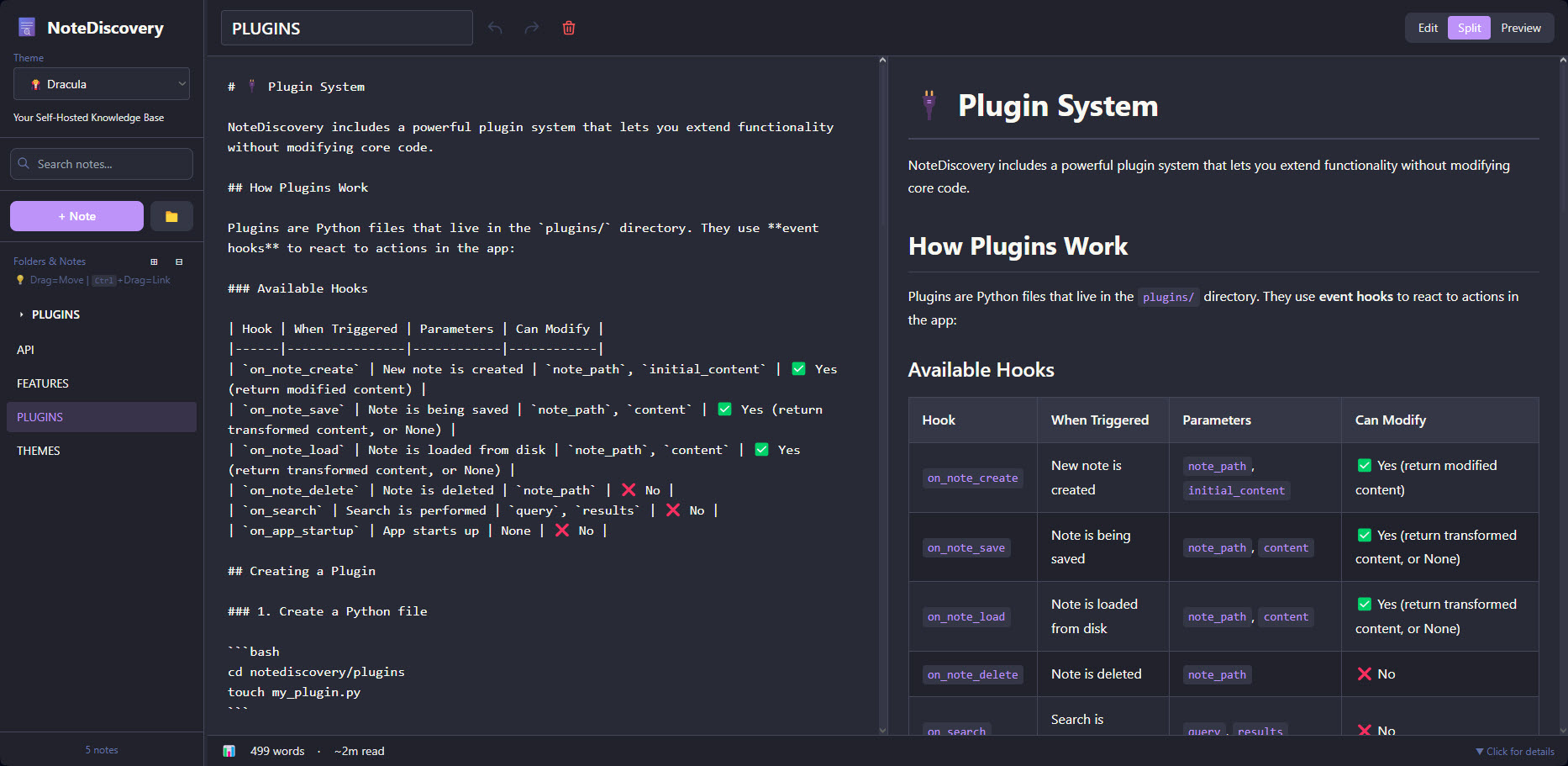
NoteDiscovery is a lightweight, self-hosted note-taking application that puts you in complete control of your knowledge base. Write, organize, and discover your notes with a beautiful, modern interface—all running on your own server.
🎯 Who is it for?
- Privacy-conscious users who want complete control over their data
- Developers who prefer markdown and local file storage
- Knowledge workers building a personal wiki or second brain
- Teams looking for a self-hosted alternative to commercial apps
- Anyone who values simplicity, speed, and ownership
✨ Why NoteDiscovery?
vs. Commercial Apps (Notion, Evernote, Obsidian Sync)
| Feature | NoteDiscovery | Commercial Apps |
|---|---|---|
| Cost | 100% Free | $xxx/month/year |
| Privacy | Your server, your data | Their servers, their terms |
| Speed | Lightning fast | Depends on internet |
| Offline | Always works | Limited or requires sync |
| Customization | Full control | Limited options |
| No Lock-in | Plain markdown files | Proprietary formats |
Key Benefits
- 🔒 Total Privacy - Your notes never leave your server
- 💰 Zero Cost - No subscriptions, no hidden fees
- 🚀 Fast & Lightweight - Instant search and navigation
- 🎨 Beautiful Themes - Multiple themes, easy to customize
- 🔌 Extensible - Plugin system for custom features
- 📱 Responsive - Works on desktop, tablet, and mobile
- 📂 Simple Storage - Plain markdown files in folders
🚀 Quick Start
Running from GitHub Container Registry (Easiest & Recommended)
Use the pre-built image directly from GHCR - no building required!
💡 Tip: Always use
ghcr.io/gamosoft/notediscovery:latestto get the newest features and fixes. Images are automatically built when PRs are merged to main.
📁 Important - Volume Mapping: The container needs local folders/files to work:
- Required:
datafolder (your notes will be stored here)- Required:
themesfolder with theme.cssfiles (at least light.css and dark.css)- Required:
pluginsfolder (can be empty for basic functionality)- Required:
config.yamlfile (needed for the app to run)Setup Options:
Minimal (quick test - download just the essentials):
# Linux/macOS
mkdir -p data plugins themes
curl -O https://raw.githubusercontent.com/gamosoft/notediscovery/main/config.yaml
# Download at least light and dark themes
curl -o themes/light.css https://raw.githubusercontent.com/gamosoft/notediscovery/main/themes/light.css
curl -o themes/dark.css https://raw.githubusercontent.com/gamosoft/notediscovery/main/themes/dark.css
# Windows PowerShell mkdir data, plugins, themes -Force Invoke-WebRequest -Uri https://raw.githubusercontent.com/gamosoft/notediscovery/main/config.yaml -OutFile config.yaml # Download at least light and dark themes Invoke-WebRequest -Uri https://raw.githubusercontent.com/gamosoft/notediscovery/main/themes/light.css -OutFile themes/light.css Invoke-WebRequest -Uri https://raw.githubusercontent.com/gamosoft/notediscovery/main/themes/dark.css -OutFile themes/dark.cssFull Setup (recommended - includes all themes, plugins, sample notes):
git clone https://github.com/gamosoft/notediscovery.git
cd notediscovery
# Now you have everything - run docker-compose below
Option 1: Docker Compose (Recommended)
# Download the docker-compose file
curl -O https://raw.githubusercontent.com/gamosoft/notediscovery/main/docker-compose.ghcr.yml

# Or if you cloned the repo, just use it directly
docker-compose -f docker-compose.ghcr.yml up -d

# Access at http://localhost:8000

# View logs
docker-compose -f docker-compose.ghcr.yml logs -f

# Stop the application
docker-compose -f docker-compose.ghcr.yml down
Option 2: Docker Run (Alternative)
# Linux/macOS
docker run -d \
  --name notediscovery \
  -p 8000:8000 \
  -v $(pwd)/data:/app/data \
  -v $(pwd)/plugins:/app/plugins \
  -v $(pwd)/themes:/app/themes \
  -v $(pwd)/config.yaml:/app/config.yaml \
  --restart unless-stopped \
  ghcr.io/gamosoft/notediscovery:latest
# Windows PowerShell
docker run -d `
  --name notediscovery `
  -p 8000:8000 `
  -v ${PWD}/data:/app/data `
  -v ${PWD}/plugins:/app/plugins `
  -v ${PWD}/themes:/app/themes `
  -v ${PWD}/config.yaml:/app/config.yaml `
  --restart unless-stopped `
  ghcr.io/gamosoft/notediscovery:latest
Access at http://localhost:8000
Why use the GHCR image?
- ✅ No build time - instant deployment
- ✅ Always up-to-date with the latest release
- ✅ Tested and verified builds
- ✅ Smaller download with optimized layers
Running with Docker Compose (Recommended for Development)
Docker ensures consistent environment and easy deployment:
# Clone the repository
git clone https://github.com/gamosoft/notediscovery.git
cd notediscovery

# Start with Docker Compose
docker-compose up -d

# Access at http://localhost:8000

# View logs
docker-compose logs -f

# Stop the application
docker-compose down
Requirements:
- Docker
- Docker Compose
Running Locally (Without Docker)
For development or if you prefer running directly:
# Clone the repository
git clone https://github.com/gamosoft/notediscovery.git
cd notediscovery

# Install dependencies
pip install -r requirements.txt

# Run the application
python run.py

# Access at http://localhost:8000
Requirements:
- Python 3.8 or higher
- pip (Python package manager)
Dependencies installed:
- FastAPI - Web framework
- Uvicorn - ASGI server
- PyYAML - Configuration handling
- aiofiles - Async file operations
📚 Documentation
Want to learn more? The full documentation lives inside the app as interactive notes!
Once you've started NoteDiscovery, you'll find comprehensive guides on:
- 🎨 THEMES.md - Theme customization and creating custom themes
- ✨ FEATURES.md - Complete feature list and keyboard shortcuts
- 🔌 PLUGINS.md - Plugin system and available plugins
- 🌐 API.md - REST API documentation and examples
Can't wait to start the app? Browse the documentation notes directly on GitHub in the data/notes/ folder!
💡 Tip: These documentation files are regular markdown notes—edit them, add your own notes, or use them as templates. It's your knowledge base!
💖 Support Development
If you find NoteDiscovery useful, consider ☕ buying me a coffee to help keep the project going. Every bit helps with new features, bug fixes, and improvements. Thank you!
🔒 Security Considerations
NoteDiscovery is designed for self-hosted, private use. Please keep these security considerations in mind:
Network Security
- ⚠️ Do NOT expose directly to the internet without additional security measures
- Run behind a reverse proxy (nginx, Caddy) with HTTPS and authentication if needed
- Keep it on your local network or use a VPN for remote access
- By default, the app listens on
0.0.0.0:8000(all network interfaces)
No Built-in Authentication
- The app has no authentication by design (single-user, self-hosted)
- Anyone with network access can read and modify your notes
- Use network-level security (firewall, VPN) for access control
- Consider adding authentication via reverse proxy if needed
Data Privacy
- Your notes are stored as plain text markdown files in
data/notes/ - No data is sent to external services
- Regular backups are recommended
Best Practices
- Run on
localhostor a private network only - Use Docker for isolation and easier security management
- Keep your system and dependencies updated
- Review and audit any plugins you install
- Set appropriate file permissions on the
data/directory
TL;DR: Perfect for personal use on your local machine or home network. Add a reverse proxy with authentication if exposing to wider networks.
📄 License
MIT License - Free to use, modify, and distribute.
Made with ❤️ for the self-hosting community