 17616dd618
included dashboard icon |
||
|---|---|---|
| .github | ||
| backend | ||
| docs | ||
| documentation | ||
| frontend | ||
| locales | ||
| plugins | ||
| themes | ||
| .dockerignore | ||
| .gitignore | ||
| CONTRIBUTING.md | ||
| Dockerfile | ||
| LICENSE | ||
| README.md | ||
| VERSION | ||
| config.yaml | ||
| docker-compose.ghcr.yml | ||
| docker-compose.yml | ||
| generate_password.py | ||
| release.ps1 | ||
| render.yaml | ||
| requirements.txt | ||
| run.py | ||
README.md
📝 NoteDiscovery


Your Self-Hosted Knowledge Base
🚀 Try the Live Demo — Contents reset daily, for demonstration purposes only
What is NoteDiscovery?
NoteDiscovery is a lightweight, self-hosted note-taking application that puts you in complete control of your knowledge base. Write, organize, and discover your notes with a beautiful, modern interface—all running on your own server.
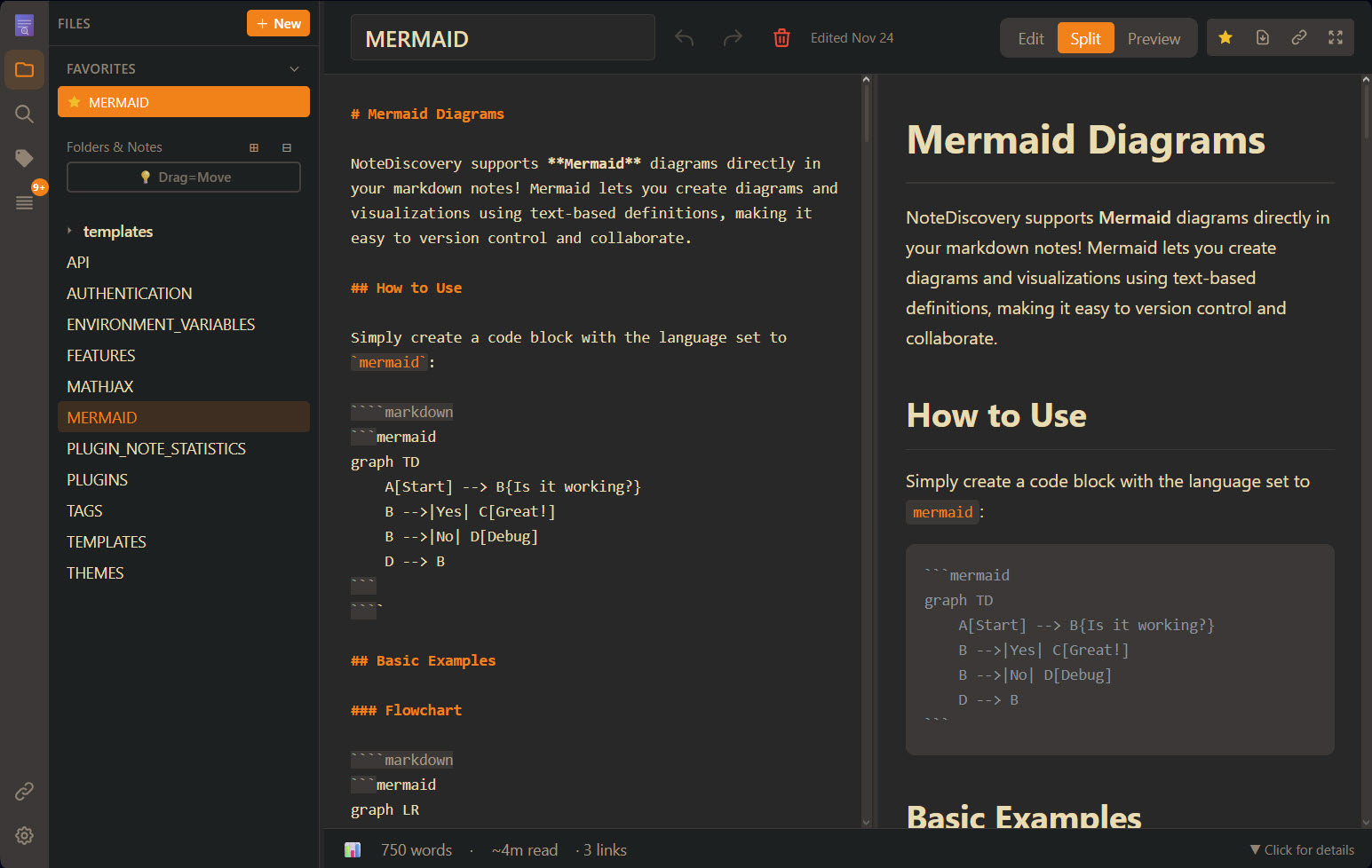
🎯 Who is it for?
- Privacy-conscious users who want complete control over their data
- Developers who prefer markdown and local file storage
- Knowledge workers building a personal wiki or second brain
- Teams looking for a self-hosted alternative to commercial apps
- Anyone who values simplicity, speed, and ownership
💖 Thanks for using NoteDiscovery!
If this project has been useful to you, consider supporting its development, it truly makes a difference!

✨ Why NoteDiscovery?
vs. Commercial Apps (Notion, Evernote, Obsidian Sync)
| Feature | NoteDiscovery | Commercial Apps |
|---|---|---|
| Cost | 100% Free | $xxx/month/year |
| Privacy | Your server, your data | Their servers, their terms |
| Speed | Lightning fast | Depends on internet |
| Offline | Always works | Limited or requires sync |
| Customization | Full control | Limited options |
| No Lock-in | Plain markdown files | Proprietary formats |
Key Benefits
- 🔒 Total Privacy - Your notes never leave your server
- 🔐 Optional Authentication - Simple password protection for self-hosted deployments
- 💰 Zero Cost - No subscriptions, no hidden fees
- 🚀 Fast & Lightweight - Instant search and navigation
- 🎨 Beautiful Themes - Multiple themes, easy to customize
- 🔌 Extensible - Plugin system for custom features
- 📱 Responsive - Works on desktop, tablet, and mobile
- 📂 Simple Storage - Plain markdown files in folders
- 🧮 Math Support - LaTeX/MathJax for beautiful equations
- 📄 HTML Export - Share notes as standalone HTML files
- 🕸️ Graph View - Interactive visualization of connected notes
- ⭐ Favorites - Star your most-used notes for instant access
- 📑 Outline Panel - Navigate headings with click-to-jump TOC
🚀 Quick Start
Quick Setup
Linux/macOS:
mkdir -p notediscovery/data && cd notediscovery
docker run -d --name notediscovery -p 8000:8000 \
  -v $(pwd)/data:/app/data \
  ghcr.io/gamosoft/notediscovery:latest
Windows (PowerShell):
mkdir notediscovery\data; cd notediscovery
docker run -d --name notediscovery -p 8000:8000 `
  -v ${PWD}/data:/app/data `
  ghcr.io/gamosoft/notediscovery:latest
Open http://localhost:8000 — done! 🎉
💡 Your notes are saved in
./data/. Themes, plugins, locales and default configuration values are included in the image.
Using Docker Compose
Two docker-compose files are provided:
| File | Use Case |
|---|---|
docker-compose.ghcr.yml |
Recommended - Uses pre-built image from GitHub Container Registry |
docker-compose.yml |
For development - Builds from local source |
Option 1: Pre-built image (fastest)
Linux/macOS:
mkdir -p notediscovery/data && cd notediscovery
curl -O https://raw.githubusercontent.com/gamosoft/notediscovery/main/docker-compose.ghcr.yml
docker-compose -f docker-compose.ghcr.yml up -d
Windows (PowerShell):
mkdir notediscovery\data; cd notediscovery
Invoke-WebRequest -Uri https://raw.githubusercontent.com/gamosoft/notediscovery/main/docker-compose.ghcr.yml -OutFile docker-compose.ghcr.yml
docker-compose -f docker-compose.ghcr.yml up -d
Option 2: Build from source (for development)
git clone https://github.com/gamosoft/notediscovery.git
cd notediscovery
docker-compose up -d
See Advanced Docker Setup for volume details.
Running Locally (Without Docker)
For development or if you prefer running directly:
# Clone the repository
git clone https://github.com/gamosoft/notediscovery.git
cd notediscovery

# Install dependencies
pip install -r requirements.txt

# Run the application
python run.py

# Access at http://localhost:8000
Requirements:
- Python 3.8 or higher
- pip (Python package manager)
Advanced Docker Setup
The image includes bundled config, themes, plugins, and locales. To customize, you must:
- Map the volume in your docker-compose or docker run command
- Provide content - the file/folder must exist with valid content (empty = app might break!)
| Volume | Purpose | Bundled? |
|---|---|---|
data/ |
Your notes | ❌ You must create |
config.yaml |
App settings | ✅ Yes |
themes/ |
Custom themes | ✅ Yes |
plugins/ |
Custom plugins | ✅ Yes |
locales/ |
Translations | ✅ Yes |
Dashboard Integration
An official icon for NoteDiscovery is now available on Dashboard Icons!
Use it in your self-hosted dashboards like Homepage, Homarr, Dashy, Heimdall, etc...
📚 Documentation
Want to learn more?
- 🎨 THEMES.md - Theme customization and creating custom themes
- ✨ FEATURES.md - Complete feature list and keyboard shortcuts
- 🏷️ TAGS.md - Organize notes with tags and combined filtering
- 📋 TEMPLATES.md - Create notes from reusable templates with dynamic placeholders
- 🧮 MATHJAX.md - LaTeX/Math notation examples and syntax reference
- 📊 MERMAID.md - Diagram creation with Mermaid (flowcharts, sequence diagrams, and more)
- 🔌 PLUGINS.md - Plugin system and available plugins
- 🌐 API.md - REST API documentation and examples
- 🔐 AUTHENTICATION.md - Enable password protection for your instance
- 🔧 ENVIRONMENT_VARIABLES.md - Configure settings via environment variables
🌍 Multiple Languages
NoteDiscovery supports multiple languages! Currently available:
- 🇺🇸 English (en-US) - Default
- 🇪🇸 Español (es-ES)
- 🇩🇪 Deutsch (de-DE)
- 🇫🇷 Français (fr-FR)
To change language: Go to Settings (gear icon) → Language dropdown.
To add your own language: See the Contributing Guidelines for instructions on creating translation files.
Docker users: Mount your custom locales folder to add or override translations:
volumes:
  - ./locales:/app/locales  # Custom translations
💡 Pro Tip: If you clone this repository, you can mount the documentation/ folder to view these docs inside the app:
# In your docker-compose.yml
volumes:
  - ./data:/app/data              # Your personal notes
  - ./documentation:/app/data/docs:ro  # Mount docs subfolder inside the data folder (read-only)
Then access them at http://localhost:8000 - the docs will appear as a docs/ folder in the file browser!
🤝 Contributing
Before submitting a pull request, especially for major changes, please:
- Read our Contributing Guidelines
- Open an issue first to discuss major features or significant changes
- Ensure your code follows the project's style and philosophy
🔒 Security Considerations
NoteDiscovery is designed for self-hosted, private use. Please keep these security considerations in mind:
Network Security
- ⚠️ Do NOT expose directly to the internet without additional security measures
- Run behind a reverse proxy (nginx, Caddy) with HTTPS for production use
- Keep it on your local network or use a VPN for remote access
- By default, the app listens on
0.0.0.0:8000(all network interfaces)
Authentication
- Password protection is DISABLED by default (default password:
admin) - ⚠️ ENABLE AUTHENTICATION AND CHANGE THE DEFAULT PASSWORD if exposing to a network!
- See AUTHENTICATION.md for complete setup instructions
- To disable auth, set
authentication.enabled: falseinconfig.yaml - Change password with Docker:
docker-compose exec notediscovery python generate_password.py - Perfect for single-user or small team deployments
- For multi-user setups, consider a reverse proxy with OAuth/SSO
Data Privacy
- Your notes are stored as plain text markdown files in the
data/folder - No data is sent to external services
- Regular backups are recommended
Best Practices
- Run on
localhostor a private network only - Use Docker for isolation and easier security management
- Keep your system and dependencies updated
- Review and audit any plugins you install
- Set appropriate file permissions on the
data/directory
TL;DR: Perfect for personal use on your local machine or home network. Enable built-in password protection if needed, or use a reverse proxy with authentication if exposing to wider networks.
📄 License
MIT License - Free to use, modify, and distribute.
Made with ❤️ for the self-hosting community